【PowerShell】指定ディレクトリのExcelファイルにパスワードを設定(再帰)
※本記事は広告を含みます
本業の方で必要になった、というかあったらいいなあと思ったので仮組み。一応動作確認はしたので動くはず!(本日2度目)
用意するもの
- Set-ExcelPassword.ps1(PowerShell)
コード
Set-ExcelPassword.ps1
# ===============================================
# Set-ExcelPassword.ps1
# - Recursively set password for Excel files
# - xlsx / xlsm / xlsb / xls
# ===============================================

# --- Ask target directory ---
$RootPath = Read-Host "Enter target directory path (e.g. D:\Data)"

if (-not $RootPath) {
    Write-Host "No path entered. Exit."
    Read-Host "Press Enter to close..."
    exit
}

if (-not (Test-Path $RootPath)) {
    Write-Error "The path does not exist: $RootPath"
    Read-Host "Press Enter to close..."
    exit
}

Write-Host "Target folder: $RootPath"
Write-Host ""

# --- Ask password (hidden, with confirmation) ---
function Get-PlainPassword {
    param(
        [string]$Prompt = "Enter password (hidden)"
    )

    $secure = Read-Host $Prompt -AsSecureString
    if (-not $secure) {
        return ""
    }

    $ptr = [Runtime.InteropServices.Marshal]::SecureStringToBSTR($secure)
    try {
        return [Runtime.InteropServices.Marshal]::PtrToStringAuto($ptr)
    }
    finally {
        if ($ptr -ne [IntPtr]::Zero) {
            [Runtime.InteropServices.Marshal]::ZeroFreeBSTR($ptr)
        }
    }
}

while ($true) {
    $Password1 = Get-PlainPassword -Prompt "Enter password (hidden)"
    if (-not $Password1) {
        Write-Host "Password is empty. Please enter again."
        continue
    }

    $Password2 = Get-PlainPassword -Prompt "Confirm password (hidden)"
    if ($Password1 -ne $Password2) {
        Write-Host "Passwords do not match. Please try again."
        Write-Host ""
        continue
    }

    $Password = $Password1
    break
}

Write-Host ""
Write-Host "Password is set. Start processing..."
Write-Host ""

# --- Collect Excel files ---
$excelFiles = Get-ChildItem -Path $RootPath -Recurse -File |
    Where-Object {
        $_.Extension.ToLower() -in ".xlsx", ".xlsm", ".xlsb", ".xls" -and
        -not $_.Name.StartsWith("~$")
    }

if (-not $excelFiles -or $excelFiles.Count -eq 0) {
    Write-Host "No Excel files found."
    Read-Host "Press Enter to close..."
    exit
}

Write-Host "Found Excel files: $($excelFiles.Count)"
Write-Host ""

# --- Start Excel ---
try {
    $excel = New-Object -ComObject Excel.Application
    $excel.DisplayAlerts = $false
}
catch {
    Write-Error "Failed to start Excel. Is Excel installed?"
    Read-Host "Press Enter to close..."
    exit
}

$successCount = 0
$failCount    = 0

foreach ($file in $excelFiles) {

    Write-Host "------------------------------"
    Write-Host "Processing: $($file.FullName)"

    $path = $file.FullName
    $book = $null

    try {
        $book = $excel.Workbooks.Open($path)

        $ext = [System.IO.Path]::GetExtension($path).ToLower()
        $fileFormat = switch ($ext) {
            ".xlsx" { 51 }  # xlOpenXMLWorkbook
            ".xlsm" { 52 }  # xlOpenXMLWorkbookMacroEnabled
            ".xlsb" { 50 }  # xlExcel12
            ".xls"  { 56 }  # xlExcel8
            default { $null }
        }

        if ($fileFormat -eq $null) {
            Write-Warning "Unsupported extension. Skip: $ext"
            $book.Close($false)
            [void][System.Runtime.InteropServices.Marshal]::ReleaseComObject($book)
            $book = $null
            continue
        }

        $book.SaveAs($path, $fileFormat, $Password, "")
        $book.Close($true)
        [void][System.Runtime.InteropServices.Marshal]::ReleaseComObject($book)
        $book = $null

        $successCount++
        Write-Host "Password set."
    }
    catch {
        Write-Warning "Error while setting password: $($_.Exception.Message)"
        $failCount++
        if ($book -ne $null) {
            $book.Close($false)
            [void][System.Runtime.InteropServices.Marshal]::ReleaseComObject($book)
            $book = $null
        }
    }
}

$excel.Quit()
[void][System.Runtime.InteropServices.Marshal]::ReleaseComObject($excel)

Write-Host ""
Write-Host "All done."
Write-Host "  Success: $successCount"
Write-Host "  Failed : $failCount"
Read-Host "Press Enter to close..."
使い方
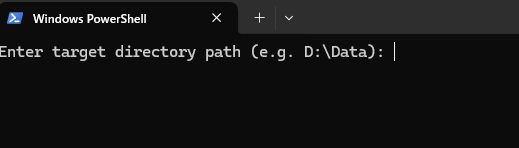
PowerShellを実行すると、入力ディレクトリを求められるので、入力します。
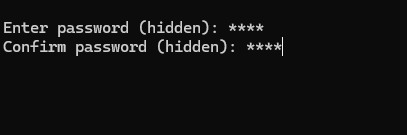
パスワードを設定します。(間違い防止のため2回)
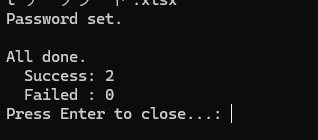
こんな感じでログが出ます。