【PowerShell】指定ディレクトリのExcelファイル名をルールに則り置換(再帰)
※本記事は広告を含みます
本業の方で必要になった、というかあったらいいなあと思ったので仮組み。一応動作確認はしたので動くはず!
用意するもの
- Rename-Files-WithRules.ps1(PowerShell)
- replace_rules.csv(置換ルールファイル)
コード
Rename-Files-WithRules.ps1
[Console]::OutputEncoding = [System.Text.Encoding]::UTF8
$PSDefaultParameterValues['*:Encoding'] = 'utf8'
# ===============================================
# Rename-Files-WithRules.ps1 (Excel only)
# - Rename file names of .xls / .xlsx recursively
# - Rules are loaded from replace_rules.csv
# ===============================================
# Ask for target folder
$RootPath = Read-Host "Enter target directory path (e.g. D:\Data)"

if (-not $RootPath) {
    Write-Host "No path entered."
    Read-Host "Press Enter to close..."
    exit
}

if (-not (Test-Path $RootPath)) {
    Write-Error "Path does not exist: $RootPath"
    Read-Host "Press Enter to close..."
    exit
}

Write-Host "Target folder: $RootPath"
Write-Host ""

# Path of script and rule file
$ScriptDir = Split-Path -Parent $MyInvocation.MyCommand.Path
$RuleFile  = Join-Path $ScriptDir "replace_rules.csv"

if (-not (Test-Path $RuleFile)) {
    Write-Host "ERROR: replace_rules.csv not found."
    Write-Host "Place replace_rules.csv in the same folder as this script."
    Read-Host "Press Enter to close..."
    exit
}

# Load rules
$Rules = @()
$Lines = Get-Content $RuleFile

foreach ($line in $Lines) {
    $t = $line.Trim()
    if ($t -eq "") { continue }
    if ($t.StartsWith("#")) { continue }

    $parts = $line.Split(",")
    if ($parts.Count -lt 2) { continue }

    $before = $parts[0].Trim()
    $after  = $parts[1].Trim()

    if ($before -eq "") { continue }

    $Rules += [PSCustomObject]@{ Before = $before; After = $after }
}

if ($Rules.Count -eq 0) {
    Write-Host "No valid rules found in replace_rules.csv"
    Read-Host "Press Enter to close..."
    exit
}

Write-Host "Rules loaded: $($Rules.Count)"
Write-Host ""

# Collect ONLY Excel files (.xls / .xlsx) recursively
$Files = Get-ChildItem -Path $RootPath -Recurse -File |
    Where-Object {
        $_.Extension.ToLower() -in ".xls", ".xlsx"
    }

if (-not $Files -or $Files.Count -eq 0) {
    Write-Host "No .xls / .xlsx files found."
    Read-Host "Press Enter to close..."
    exit
}

Write-Host "Excel files found: $($Files.Count)"
Write-Host ""

$Renamed = 0
$Skipped = 0

foreach ($file in $Files) {

    $dir  = $file.DirectoryName
    $name = $file.Name
    $path = $file.FullName

    $newName = $name

    foreach ($rule in $Rules) {
        $newName = $newName.Replace($rule.Before, $rule.After)
    }

    if ($newName -eq $name) {
        $Skipped++
        continue
    }

    $target = Join-Path $dir $newName

    # Skip if new file name already exists
    if ($target -ne $path -and (Test-Path $target)) {
        Write-Warning "Skip: target exists -> $target"
        continue
    }

    Write-Host "Rename:"
    Write-Host "  From: $name"
    Write-Host "  To  : $newName"

    try {
        Rename-Item -Path $path -NewName $newName -Force
        $Renamed++
    }
    catch {
        Write-Warning "Failed to rename: $($_.Exception.Message)"
    }
}

Write-Host ""
Write-Host "Done."
Write-Host "Renamed  : $Renamed"
Write-Host "Unchanged: $Skipped"
Read-Host "Press Enter to close..."
replace_rules.csv
(,(
),)
新,旧
置換前,置換後の1セットで記述します。
使い方
PowerShellを実行すると、入力ディレクトリを求められるので、入力します。

入力した後エンターを押すと、処理が走ります。
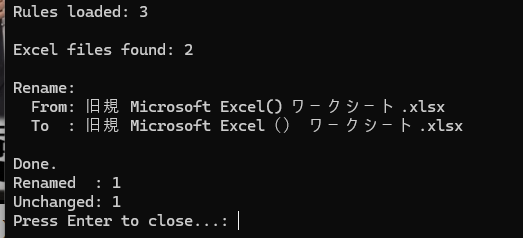
こんな感じで実行ログがでます。