Created an English Page on Ghost Blog [Trial Run]
This post details the implementation structure and steps for adding English pages to a Ghost blog. We cover URL routing settings in `routes.yaml`, creating an English UI template, operational rules, and how to achieve zero operational cost using the Gemini API for automated posting.
*This post contains advertisements
Hello everyone, I'm a professional engineer. I'm in a somewhat indescribable mood as I prepare to return to work tomorrow, but for now, I want to dive into something interesting today.
Implementation Vision
The implementation followed these principles:
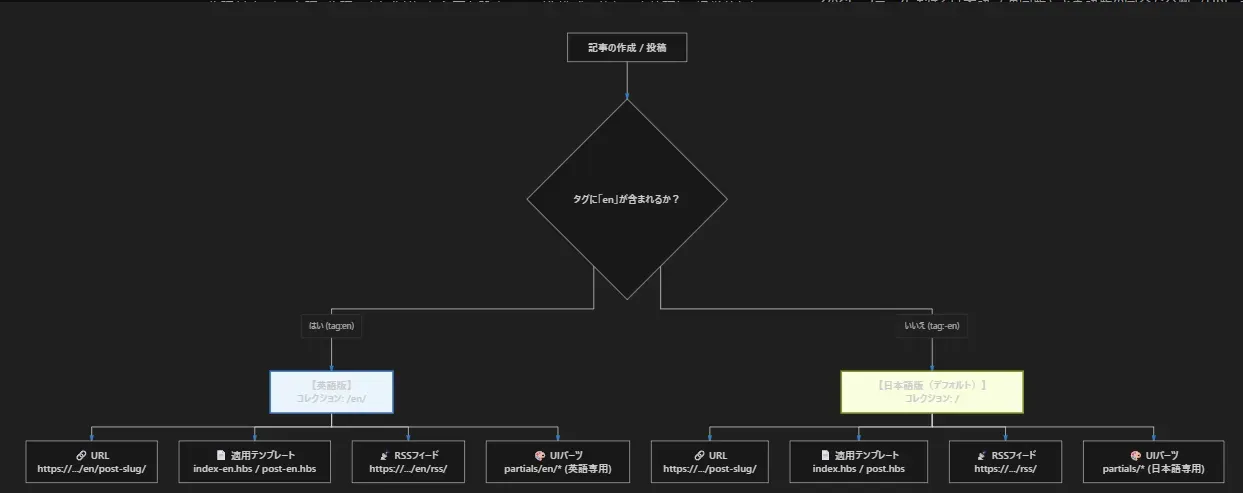
- English and Japanese pages are treated as separate articles.
- English and Japanese page templates (materials for creating the Ghost UI) are kept separate.
- Selecting the English template during article posting internally designates it as an English page.
While another option was to include both Japanese and English text in a single article and use branching logic, I chose this structure to make it easier to separate later if I decide, 'Do we really need an English page? Isn't the browser's translation feature enough?'
Requirements for English Language Support
Let's immediately introduce the elements needed to create the English version of the page.
Modifying routes.yaml
Ghost provides a URL routing file, which we use to differentiate between English and Japanese pages. This results in the following URL structure:
routes:

collections:
  /en/:
    permalink: /en/{slug}/
    template: index-en
    filter: tag:en
  /:
    permalink: /{slug}/
    template: index
    filter: tag:-en

taxonomies:
  tag: /tag/{slug}/
  author: /author/{slug}/
Creating the English UI
As mentioned above, I created a dedicated template for the English version. Initially, I intended to keep the display elements identical for both Japanese and English, but since related articles and rankings were mixing across languages, I decided to slightly alter the display elements for the English version.
Defining Operational Rules for Article Posting
To create English articles, I established the following rules, specifically these three points:
- Assign the tag 'en' to the article.
- The article slug should be '[Japanese article slug]-en'.
- Select the English template when posting the article.
Based on the information set here, the system switches to prevent Japanese and English pages from getting mixed up.
Content of English Articles
I am not fluent in English and, of course, cannot write articles in English! Therefore, I decided to use the Gemini API for translation. Thank you, Gemini. I probably wouldn't have even considered implementing an English page without AI.
Regarding posting, I modified the plugin from a recent project where I
Created an Obsidian Plugin for Blog Posting
so it now automatically creates and posts English articles when I publish.
Since English articles are generated alongside Japanese articles just by writing as usual, the operational cost is zero! Yay!
Conclusion
I decided to try this on a whim, but whether it will actually lead to an increase in traffic remains to be seen. It's an unknown!
This article was translated from the original Japanese version (Ghostブログに英語ページを作成してみた【試験運用】) using Gemini API.